

What Actually Happened Inside an Account During Its First Two Weeks, Before Anyone Declared It “Onboarded”?
Most teams cannot answer that question with any precision. They can report logins, checklist ticks, maybe a support ticket count. What they usually cannot say is whether the account did the one piece of real work that made the product worth paying for, or whether it simply clicked through a sequence someone designed to look like progress.
That gap is where early churn hides, and it is where a lean cross-functional team without a single onboarding owner tends to guess instead of measure.
Define the First Meaningful Account Outcome
Onboarding, in any B2B SaaS product, is not a welcome screen or a tour.
It is the operating system that runs:
- from invitation
- through provisioning
- setup
- first value
- collaboration
- and reinforcement,
compressed into roughly the first two weeks of an account’s life.
Treated as a system rather than a screen, it has:
| inputs | outputs |
|---|---|
| that can stall | that can be measured |
Treated as a screen, it becomes a thing to admire once and forget.
The distinction that matters most inside that system is between an individual’s first success and the account’s activation. One person completing a task proves the product works for them. It does not prove the account has adopted the product, and conflating the two is how teams convince themselves a trial is healthy when it is actually running on one engaged user who may leave the company next quarter.
A meaningful outcome, then, has to be defined as visible completed work: a report generated and shared, a workflow run end to end, a dataset connected and queried, not merely a feature viewed or a tooltip dismissed. Feature exposure is cheap to manufacture and easy to fake in a demo. Completed work is not.
How Role Changes What Counts as a Win
An administrator’s meaningful outcome is different from an end user’s. The admin’s early win usually looks like a working configuration: permissions set, integrations connected, data flowing. The end user’s win looks like output: the first report, the first automated task, the first thing that would have taken longer without the tool.
How Use Case and Maturity Shift the Bar
A single-workflow use case has a narrow, fast outcome. A multi-department rollout has a longer path, and treating both accounts against the same 14-day yardstick will make the complex one look like a failure when it is simply earlier in its own cycle.
Collecting less setup information speeds up entry, but it also removes the context a team needs to personalize onboarding or size an implementation correctly. Every field cut at signup is a trade-off, not a free win.
Separate User Activation From Account Activation
An account can look busy while remaining unadopted. One engaged administrator building out a workspace can generate enough activity to satisfy a dashboard while every other seat sits untouched. That is exactly the pattern that produces a confident renewal conversation followed by a silent cancellation.
The signals below are observable evidence, not role assignments or provider duties.
| Progress Type | What It Looks Like | Observable Evidence |
|---|---|---|
| Individual first success | One user completes a real task | A finished output tied to that user’s login |
| Workspace readiness | Admin configuration is functional | Integrations connected, permissions set correctly |
| Collaborator participation | Others join and act | Invited teammates logging in and completing work |
| Recurring team use | The workflow repeats without prompting | Return visits and repeat task completion across seats |
Power users deserve separate attention here, because a power user who has simply finished setup faster than everyone else is not the same evidence as a power user whose workflow has been copied by two or three teammates. The second case is what a repeatable team habit looks like. The first is still one person.
Expose the Friction That Delays First Value
Before prescribing anything, it is worth cataloguing where accounts actually stall, because the fixes that follow only make sense against specific failure points rather than a general sense that onboarding “needs improvement.”
- Unnecessary fields at signup: every field beyond what is needed to route the account correctly adds drop-off risk before the product has proven anything.
- Premature feature education: walking a new user through capabilities they have no task for yet teaches nothing and delays the one thing that would build trust, a completed job.
- Unclear data or configuration requirements: when an admin does not know what inputs are needed to finish setup, the account stalls in ambiguity rather than in effort.
- Stalled invitations: teammates invited but never activated leave an account looking collaborative on paper and isolated in practice.
- Access and provisioning uncertainty: users unsure what they are permitted to do will wait rather than risk breaking something, which extends time to first value without anyone noticing.
- Support handoffs with no context: a ticket that starts from zero context signals to the account that nobody was watching.
Progressive disclosure and prefilled states are worth testing against these points rather than assumed to work everywhere. A 2026 onboarding redesign case study on the Tomo product reduced a long signup form into five steps and five screens using exactly that approach.
That is a result for that product’s specific form, not a universal fix for every friction point above, and it is worth treating as one data point rather than a template. None of this replaces a genuine product-value mismatch; if the underlying workflow does not solve a real problem, smoothing the form will only get the user to disappointment faster.
Map the Fourteen-Day Path to a First Win
The operating question underneath any onboarding redesign is narrower than it sounds: which minimum actions have to happen before an account can see value, and at which of those actions can the path safely branch by complexity, without forcing every account through the same sequence regardless of what it actually needs?
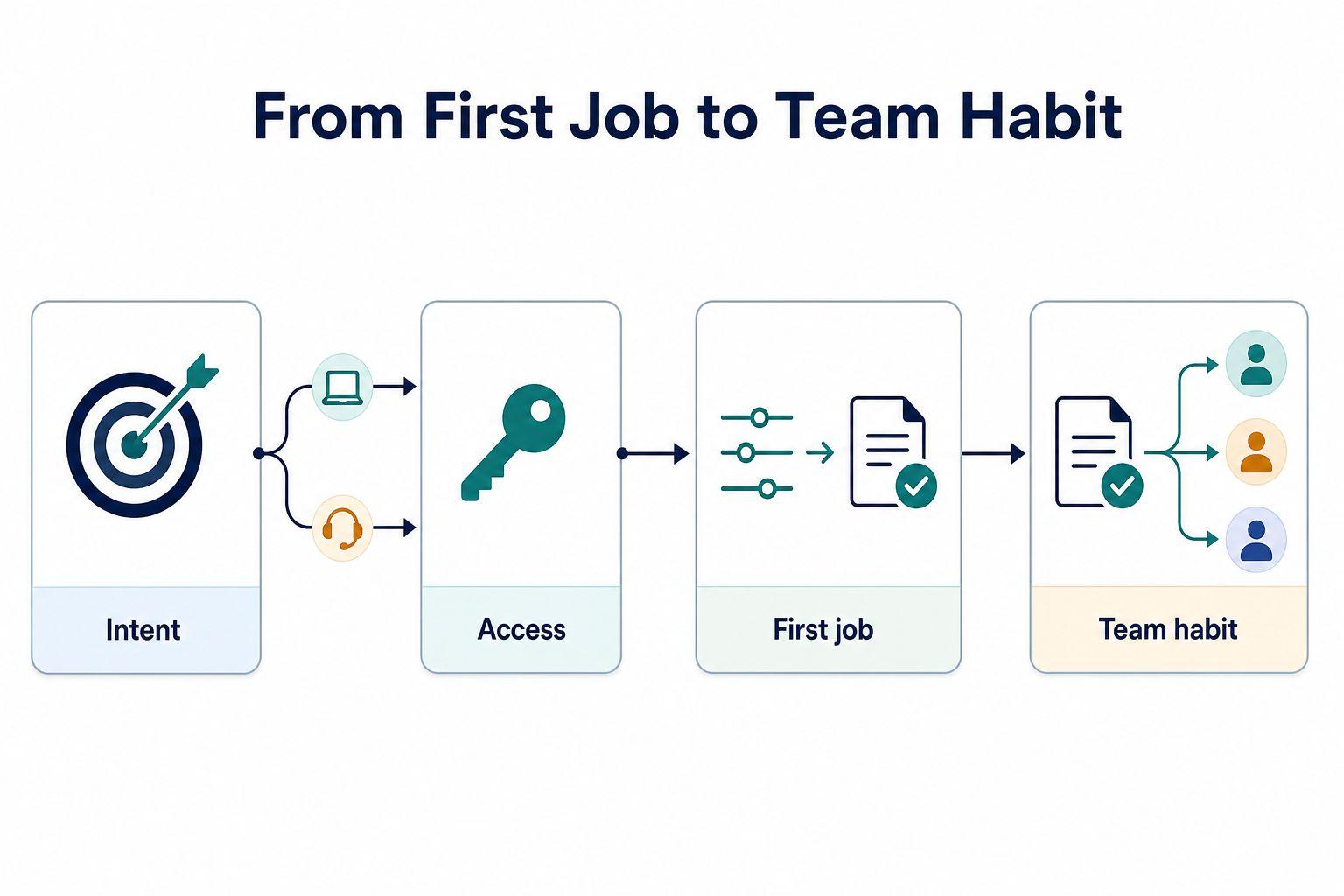
That question resolves into a small number of phases, none of them tied to a specific day, because a single-user workflow and a multi-department rollout will move through them at very different speeds. In practice they run in this order:
- Entry and intent capture, where the account signals what it actually needs before it hits its first stall.
- Access and just-in-time provisioning, where permissions are granted close to the moment they matter rather than all at once.
- Guided setup and the first completed job, where configuration is scoped to one real outcome instead of a full feature tour.
- Teammate invitation and reinforcement, where collaboration is introduced once there is something worth collaborating around.
Entry And Intent Capture
The first branch point is intent. An account that signals a narrow, well-defined use case at signup can be routed toward a fast, self-service path. An account that signals size, multiple departments, or integration complexity should be flagged for a hybrid or high-touch path before it ever hits a stall, not after.
Access And Just-In-Time Provisioning
Provisioning decisions belong as close to the moment of need as possible. Granting broad access upfront trades a short-term convenience for a long-term security and trust problem; granting access just before it is needed keeps the account moving without over-provisioning accounts that may never use half of what they were given.
Guided Setup And The First Completed Job
Setup should be scoped to what is required for one real job to finish, not to a full configuration of every feature. The first completed job is the evidence point that matters, and everything upstream of it exists only to make that moment possible.
Teammate Invitation And Reinforcement
Invitations work best when they appear at the moment collaboration becomes useful, for instance right after a first output is ready to share, rather than as a generic prompt on day one before there is anything to invite someone into. Reinforcement after that first win, through contextual guidance or a human check-in, should be conditional on account complexity: a simple account may need nothing further, while a complex one may need a person.
Instrument the Signals That Predict Progress
The measurement rule is simple to state and easy to violate: track what predicts retention, not what is easy to count. Logins and page views are easy to count and predict almost nothing on their own.
A 2026 onboarding automation article recommends a specific method worth adopting as a method, not a fixed answer: inspect the first days of account behavior, then test a small set of events against later retention to find which ones actually correlate. That is a testable exercise to run on a given product’s own data, not a guarantee that any particular event list will transfer.
Which Metric Answers Which Question
The table below lines up each signal against the specific drop-off question it exists to answer, because tracking a metric without a question attached is how dashboards fill up with numbers nobody acts on.
| Metric | What It Signals | Drop-Off Question It Answers |
|---|---|---|
| Activation rate | Share of accounts reaching a defined meaningful outcome | Where do accounts stop before completing real work? |
| Time to first value | Speed from entry to first completed job | Which phase is slowing accounts down most? |
| Setup completion | Whether configuration finished, not just started | Where does configuration get abandoned? |
| Teammate invitation / active collaborator rate | Whether collaboration actually took hold | Are invitations sent but never accepted? |
| Early repeat-use rate | Whether the first win became a habit | Does the account return without a prompt? |
Remove One Barrier at Each Decision Point
Each fix below targets one decision point identified earlier, and each carries a guardrail so that reduced friction does not become reduced trust or a compliance gap by accident.
- Defer nonessential fields at signup, moving anything not needed for routing to a later step. Guardrail: keep fields required for security or compliance in place regardless of length.
- Prefill known account context wherever it already exists in a CRM or prior interaction. Guardrail: let the user confirm prefilled data rather than assuming it is correct.
- Clarify why configuration is needed, stating the reason a setting matters rather than just requesting it. Guardrail: avoid over-explaining to the point of adding new friction.
- Present invitations at the moment collaboration becomes useful, not before there is anything to share. Guardrail: never make invitation mandatory before the first output exists.
- Offer just-in-time provisioning for access beyond the minimum needed to start. Guardrail: log and review elevated access rather than granting it silently.
- Route complex accounts to human support once configuration signals multi-department or integration complexity. Guardrail: define the complexity threshold in advance so routing is not a judgment call made under pressure.
Organization invitations and provisioning deserve this explicit treatment because they are the two points most likely to be treated as an afterthought, when in practice they decide whether an account activation event ever produces a second or third active user.
Align Education and Support Around Real Work
Guidance that repeats after the first meaningful outcome should point at the next real job, not replay the same tour that ran at signup. A user who has just generated their first report does not need to be shown the dashboard again; they need to be shown what to do with that report or who else should see it.
Product messaging, documentation, and customer-success outreach work better when they share one definition of account progress and one visible trigger for escalation, so a support agent and a success manager are not operating on different pictures of where an account actually stands.
Contextual Education
Education tied to the action a user just completed, or the one immediately ahead of them, holds attention longer than a general capability walkthrough delivered before there is any task to apply it to.
Complexity-Triggered Human Help
Human intervention should trigger on account complexity signals, such as multiple stalled invitations or unfinished configuration past a reasonable point, rather than on a fixed day count. Onboarding software can support this, but it is secondary to having a coherent flow and working instrumentation in the first place; a tool cannot compensate for an undefined outcome.
Review Three Accounts And Test One Friction Point
Before changing anything, look at what three real accounts actually did.
The next two days are enough to do this properly, in this order:
- Today, pull three accounts: one activated, one stalled, one churned or at-risk. Choose them first, before forming any theory about what you expect to find, so the comparison stays honest.
- Today, compare what each one completed or skipped before reaching, or missing, the first meaningful outcome. Do this side by side, account by account, not from memory.
- Tomorrow, name the single highest-friction moment that shows up in more than one of the three. If nothing repeats across accounts, that itself is a finding: the problem may be account-specific rather than systemic.
- Tomorrow, design one bounded test against that moment only. Resist the urge to fix everything the review surfaced; a test aimed at three friction points at once will not tell you which one moved the number.
The order matters because comparing first, before touching anything, keeps a redesign from being built on assumptions about where accounts stall rather than evidence of where they actually did.
About the Author